Order board
See shop, phone and supported website orders in one place. Review production, collection and delivery stages and make supported bulk status changes on busy days.

ORDERS & FULFILMENT
Give the team a shared view of what needs making, collecting or delivering. The instructions, progress and photographs stay with the order as it moves through the shop.
Questions before joining? Contact us
£79/month per shop after a 30-day no-card trial · Core features included · SMS, hardware and external services separate
 View larger
MADE FOR THE WAY YOU WORK
See shop, phone and supported website orders in one place. Review production, collection and delivery stages and make supported bulk status changes on busy days.
See orders by their required date, assign the making to a florist and keep card messages, recipient details and production notes close at hand.
Create standalone tasks or link them to an order. Assign colleagues, due dates, priorities and checklists, with team notes and repeating daily, weekly or monthly work.
Print worksheets for the workbench and check the order’s print history before producing another copy. QR codes link the paperwork to delivery scanning.
Notice new orders from connected providers in the browser. Use Print order directly from an incoming browser notification to open the order’s print view.
Follow timestamped activity, florist assignments, customer updates and delivery progress. Keep an arrangement photo, delivery photo and driver notes with the order.
Build dated runs, scan worksheet QR codes and assign drivers. Drivers open their runs on a phone, follow directions and record delivery completion.
Explore the driver app ↗Keep the buyer informed with included order-update emails. Add UK SMS delivery updates using separately charged monthly packages or one-off credits.
Explore email & text updates ↗A CLOSER LOOK
 View larger
PUT IT TO WORK
Check required dates, assign the making and give each colleague a clear task.
Print worksheets, save arrangement photos and group deliveries into runs.
Record completion, delivery evidence and customer updates against the original order.
THE PRACTICAL DETAILS
See how the tools fit your shop before making a change.
Yes. Orders from supported, connected providers appear alongside shop and phone orders. Import timing depends on the connection.
Yes. Incoming browser order notifications include Print order, opening the printable order view. The Windows notifier opens the order in your browser, where staff can print using their normal access.
No. Tasks, fulfilment and payments have their own records. Completing a checklist does not mark the order delivered or record a payment.
IT ALL WORKS TOGETHER
Plan delivery runs, scan worksheets and keep customer updates, delivery photos and notes with the order.

Free order update emails with Core, plus optional UK text updates. Choose a monthly SMS package or one-off credits, with ETA and photo links when available.

A mobile browser app for florist drivers. Open assigned delivery runs, scan worksheet QR codes, follow directions and record delivery photos and notes.
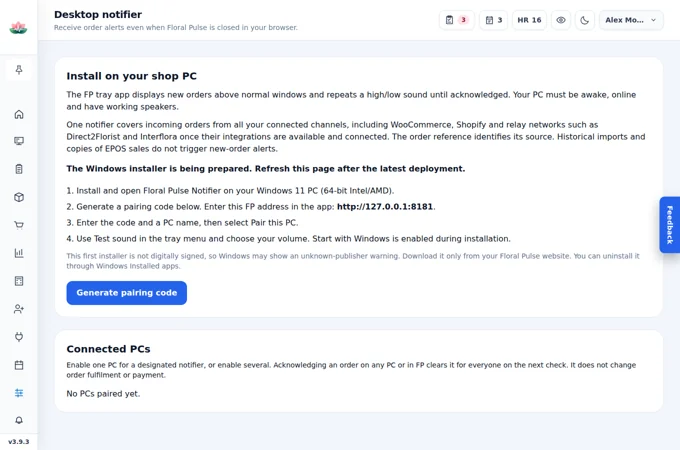
Hear new connected website orders with the Floral Pulse Windows desktop notifier. Pair shop PCs, open orders and share acknowledgement with browser alerts.
YOUR SHOP. YOUR NEXT CHAPTER.
Create your account and start your 30-day free trial with no card required. All core features are included for one shop.
No card required. No automatic Core subscription charge.
£79/month if you choose to subscribe after the trial.