Built in a flower shop. Shaped by florists. Start your trial

THE FLORIST’S WORKROOM

More time
for flowers.
Less admin.

Florist EPOS, website orders, stock and deliveries. One place to keep the business behind your bouquets moving.

£79/month per shop after a 14-day trial · Unlimited staff

FLORAL PULSE / WORKROOMIllustrative preview
FP.OrdersEPOSStockDeliveries
A little more organised.

Your workroom

Today
To make08
Ready to go05
On delivery03

In the workroom 2

Website order

Florist’s choice

Hand-tied bouquet · £45

Card messageIncluded
RJIn production
Collection

A little thank you

Gift-wrapped bouquet

Ready for delivery 1

Delivery run

Afternoon flowers

3 stops · Shop to doorstep

  1. Leave the shop
  2. Deliver & record
  3. Return to workroom
Worksheet ready
Your website. Your shop.Connected through WooCommerce.
WOO
Built around your working day
  • Florist EPOS
  • WooCommerce sync
  • Stock & purchasing
  • Delivery runs

ONE CONNECTED WORKROOM

From the first order
to the last delivery.

Keep the details that matter together, so your team can spend less time chasing orders and more time making them.

02 / CONNECT

Website orders,
without the retyping.

Connect WooCommerce orders and customers. Configure price and stock sync, with order details available to the team in Floral Pulse.

WooCommerce integration
03 / MAKE

A clearer order board.

See what needs making, assign a florist and print a worksheet. Keep card messages, recipient details and production notes with the order.

Made for busy workrooms
04 / STOCK

Know what you
have to sell.

Track counted products, manage suppliers and receive purchases. Leave made-to-order bouquets untracked where that suits your shop.

Explore stock & purchasing ↗
05 / DELIVER

Get the details
to the doorstep.

Group orders into delivery runs, plan the route and give drivers the notes they need. Record delivery photos and completion against the order.

Delivery workflows
06 / UNDERSTAND

Keep sight of
the numbers.

Review sales, VAT and recorded refunds across shop and website orders. Reconciliation checks highlight records that need attention.

Explore sales & reporting

All core features are included in one £79/month subscription per shop. Use your own computer or tablet; hardware and third-party service fees are separate.

MORE THAN TAKING AN ORDER

A better flow.
A stronger shop.

Serve customers, keep stock moving and understand the numbers. Explore the tools behind a more organised working day.

FLORIST EPOS & CUSTOMER ORDERS

Take the sale. Keep the story.

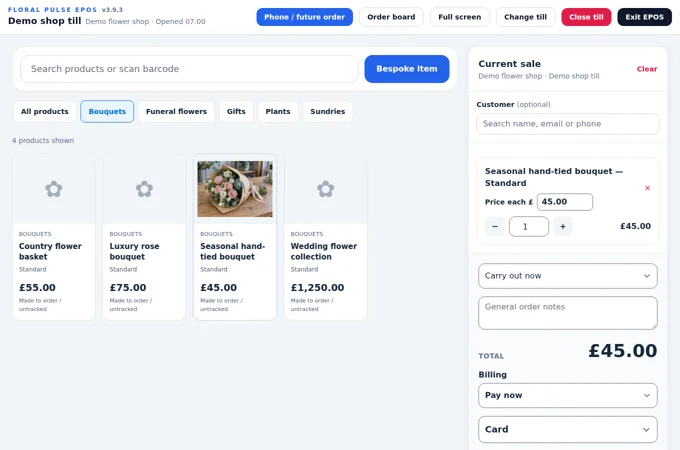
A bouquet is more than a price. Capture who it is for, what the card should say and when it is needed, then carry those details into the workroom.

  • Shop and phone orders, with future required dates
  • Returning customers and their order history
  • Held sales, receipts, invoices and recorded refunds
Explore florist epos ↗
Counter orderCollection

A little thank you

Hand-tied bouquet£45.00
RequiredTomorrow
Card messageIncluded
Ready for the workroom

Illustrative preview · example details

STOCK MANAGEMENT & PURCHASING

Buy with a clearer picture.

See what is available, what needs attention and what is already on order. Track gifts and sundries without forcing stock counts onto every made-to-order bouquet.

  • Low-stock views, stocktakes and location transfers
  • Supplier records, purchase orders and partial deliveries
  • Pack quantities, unit costs and stock valuations
Explore stock & purchasing ↗
Stock that needs attentionMain shop

A clearer buying list

Gift candles4 available
Low-stock level6 units
Already on order12 units
Check incoming stock before reordering

Illustrative preview · example details

SALES REPORTING & BUSINESS INSIGHT

Make the numbers useful.

Review sales, recorded refunds, VAT and stock figures together. Share a monthly report with the owner or accountant without rebuilding the same email every month.

  • Combined EPOS and WooCommerce reporting
  • Transaction exports and reconciliation checks
  • Scheduled monthly emails to multiple recipients
Explore sales & reports ↗
Monthly reportIllustration

The whole sales picture

Sales before refunds · inc VAT£5,400
Recorded refunds · inc VAT−£150
Sales after refunds · inc VAT£5,250
Share with your owner and accountant

Illustrative preview · example details

FLORIST DELIVERY MANAGEMENT

From the workroom
to their doorstep.

Sort the day’s deliveries, assign drivers and keep every stop connected to its order. Scan worksheets for faster run building, then take the details out on the road.

01 / PLAN THE DAY

Give every delivery a place.

Organise orders into dated runs and assign a driver. Keep the shop, driver and delivery list working from the same order details.

02 / BUILD THE RUN

Assign orders or scan as you go.

Add deliveries from the workroom or let a driver scan printed worksheet QR codes into their planned run. Check the order date as each one is added.

03 / SORT THE STOPS

Optimise before setting off.

Plan the stop sequence from the shop and back again. Estimated arrival times help with preparation; route optimisation requires a configured Google Routes connection.

Illustration of a florist scanning a delivery worksheet QR code with a phone beside a bouquet
Illustrative scene · Scan printed worksheets as you prepare the delivery run.

SCAN. CHECK. DELIVER.

The right flowers.
The right run.
The right date.

A quick scan helps catch a wrong-date delivery before it leaves the shop.

  1. Scan the worksheet

    Use the order’s QR code to open its delivery details and choose a planned run.

  2. Check the required date

    Floral Pulse compares the order’s recorded required date with the selected run date. A mismatch needs explicit confirmation before the order can be added.

  3. Prepare the run

    Once the orders are checked, optimise the route. Drivers can record notes, a delivery photo and completion against each order.

EXAMPLE DATE CHECK

Tomorrow’s flowers on today’s run?

An early delivery may be intentional. The warning makes the difference visible so staff can check before continuing.

Date mismatch — confirmation required
Order required
Friday 11 September
Selected run
Thursday 10 September

Check the dates before adding this delivery. Confirm only if the different run date is intentional.

Illustrative warning, not a live order

THE DRIVER’S SIDE OF THE WORKROOM

The run in their hand.
The updates back at the shop.

Drivers sign in to a mobile-friendly web portal with their phone number and PIN. They see their assigned runs and can open each stop’s delivery details.

  • View the recipient, address and delivery notes.
  • Open directions and work through the planned stops.
  • Record a delivery photo and leave a note.
  • Mark delivered or no answer, with activity saved in the order history.

Works through the phone’s browser. Internet access is required; this is not an offline or app-store download.

Illustration of a driver photographing a bouquet at a doorstep as proof of delivery
Illustrative scene · Keep delivery evidence with the order.

KEEP CUSTOMERS AND THE SHOP INFORMED

A delivery update.
A photo.
A clearer record.

Customer email updates can let the order’s contact know when their delivery is the next stop and when it has been delivered, where an email address is available and mail is configured.

Delivery photos and driver notes stay with the order history for the shop to review. When the driver marks a delivery complete, the saved photo and note can also accompany the customer’s delivery email.

Example customer emailYour delivery is the driver’s next stop.

We will be with you shortly.

Updates follow recorded run progress, not live vehicle tracking. Estimated arrival times can change.

The check uses the required date saved on the order. Staff still need to verify missing or incorrect dates and any agreed early deliveries.

THE WHOLE STORY, IN ONE PLACE

Every bouquet
has a story.

See how an order moved through your shop: when it was created, which run it joined, the bouquet before dispatch and the photo at the doorstep. Keep recorded activity, driver notes and delivery emails together.

A clear answer when a customer calls.

Open the order and follow its history. Check the recorded times, review the arrangement and see where the driver left the flowers.

  • Timestamped order and delivery activity
  • A separate photo before dispatch
  • Next-stop and delivered email records
  • Delivery photo and driver notes
  • Completion recorded against the order

This example uses fictional names and illustrative bouquet photos. It follows one completed delivery from the shop to the doorstep.

See the customer’s updates ↓

EXAMPLE ORDER · FP-10428

Pink & white hand-tied bouquet

Customer: Emma Taylor
Recipient: Sophie Reed

Completed

Order history

12 September · Newest first · Example times

  1. Order completed

    The order was completed following successful delivery.

  2. Customer emailed — delivered

    Delivery confirmed to Emma, with the driver’s note and delivery photo attached.

  3. Delivery completed

    Alex Morgan recorded: “Left in the sheltered porch, as requested.”

    Illustrative pink and white bouquet left at a sheltered doorstep
    Delivery photo · Illustrative image
  4. Customer emailed — next stop

    “Your delivery is the driver’s next stop. We will be with you shortly.”

  5. Out for delivery

    Afternoon delivery run started by Alex Morgan.

  6. Arrangement photo added

    A photo of the finished bouquet was saved before it left the shop.

    Illustrative pink and white hand-tied bouquet on a florist workbench before dispatch
    Before dispatch · Illustrative image
  7. Added to delivery run

    Added to the afternoon run for 12 September.

  8. Order created

    A shop order was created for Emma Taylor’s bouquet.

KEEP THE PERSON WHO ORDERED IN THE PICTURE

On its way.
Next stop. Delivered.

Reassure the customer through the delivery journey. Send an order-status email from the shop, then let driver progress trigger next-stop and delivered updates.

Illustrative email wording and layout. Updates go to the order’s customer or billing email address when available and email is configured. The delivery photo is an attachment, shown here as a preview. Updates reflect recorded driver progress, not live vehicle tracking; arrival estimates may change.

A SMALL CHANGE. A CLEARER PRICE.

What goes into
your bouquet price?

Flowers are only the start. Try the calculator with your stems, making time and packaging to see how the numbers add up.

Build your bouquet

Demo figures · GBP · Enter costs excluding recoverable VAT.

Flowers & foliageQuantityCost each
£
£
£

Allow for your time

Include your sundries

Set your assumptions

YOUR PRICING SNAPSHOT

Estimated selling price

£59.40

Including VAT at 20%

Flowers & foliage
£12.75
Labour
£3.00
Sundries
£0.48
Total cost entered
£16.23
Selling price before VAT
£49.50
VAT on selling price
£9.90
Compared with your current priceCalculated when you change an input

Illustration only. Multiplier applies to all entered costs. Rent, waste, fees and other overheads are excluded. If VAT is not recoverable, include it in your costs. This is not a profit forecast.

Explore pricing in Workroom

BUILT BY FLORISTS, FOR FLORISTS

We know what
a busy flower shop
feels like.

The ringing phone. The bouquet to finish. The driver waiting for an address.

Floral Pulse comes from the day-to-day experience of running The Flower Fountain, paired with the technical experience of Eonian IT Solutions. The aim is simple: software that fits the shop.

Try it in your shop
RJ

THE FLORIST’S PERSPECTIVE

Rhiann Jones

Florist and director of The Flower Fountain. Bringing decades of experience in flowers, customers and the practical demands of the workroom.

MB

THE TECHNICAL PERSPECTIVE

Mark Bowen

Owner of Eonian IT Solutions and director of The Flower Fountain. Connecting real shop experience with IT and business systems.

Real shop experience.
A shared ambition to make it simpler.

ONE SHOP. ONE PLAN.

The tools you need.
A clear monthly price.

All core features, with unlimited staff accounts, customers, products and records for one shop.

FLORAL PULSE CORE

£79 / month per shop

Start with a 14-day free trial. Then £79/month unless cancelled. Create your account and confirm your payment method in secure checkout to unlock your workspace.

Start your 14-day trial ↗

No subscription payment is taken during the free trial. We email you before your trial ends. Your exact trial end and first payment date are shown before confirmation. Returning subscriptions do not receive another automatic trial.

Floral Pulse is currently not VAT registered. No VAT is added to this subscription price.

Included for your shop

  • Web-based EPOS on computers and tablets
  • Orders, customers and florist worksheets
  • WooCommerce connection
  • Stock, suppliers and purchasing
  • Delivery runs and mobile driver tools
  • Florist costing and quotation tools
  • Reports and documents
  • Unlimited staff and records
  • Light and dark modes

Internet access required. Hardware, card processing, website hosting and external mapping or messaging charges are separate. Check printer and scanner compatibility with your device.

Manage payment details, subscription invoices and cancellation in Account → Billing. Cancellation takes effect at the trial or billing-period end shown in your account.

COMPARE FLORIST SOFTWARE

The details,
side by side.

Compare everyday orders, an EPOS and delivery tools. Packages and billing terms differ; the price basis is shown below.

Checked 11 September 2026. Scroll the table sideways on a smaller screen.

Floral Pulse, Strelitzia Shop and Studio with Go, and Digital Florists Orders with POS
Feature / termsFloral PulseStrelitziaDigital Florists
PackageCoreShop & Studio + GoOrders + POS
Published price basis£79/month per shop£85/month per shop¹£90/month equivalent per location²
Billing termsMonthly£65 monthly + £20 Go£75 annual-billing rate + £15 POS
Setup chargeNo setup charge£150No setup charge
EPOS software✓ Included✓ Included; Windows required✓ With POS add-on above
Orders & customer records✓ Included✓ Included✓ Included
Workroom / production view✓ Included✓ Included✓ Included
Delivery tools✓ Included³✓ With Go above✓ Included
Reports✓ Included✓ Included✓ Included
Staff allowanceUnlimitedAsk provider15 included
Order allowanceUnlimited recordsAsk provider1,000/month; peak allowance applies
Website connectionsWooCommerceProvider connectors / paid webhooks2 integrations included
Trial / demonstration14-day trial with payment methodFree demonstration30-day trial without a card

1. Strelitzia

£85 is calculated from £65/month Shop & Studio plus £20/month Go. An annual Shop & Studio rate is also offered. VAT treatment is not specified on the pricing page; confirm the payable total with the provider.

2. Digital Florists

£90 is calculated from the displayed £75/month Orders rate, billed annually, plus £15/month POS. Prices exclude VAT. This is an annual-rate monthly equivalent, not a verified monthly-contract quote.

3. Floral Pulse

£79 is billed monthly. Floral Pulse is currently not VAT registered. Hardware and external service charges are separate. Route optimisation needs a configured mapping service.

A tick means the named package offers the feature, not that every implementation is identical. “Ask provider” means the allowance has not been verified. Prices and features can change.

Official sources: Strelitzia pricing · Strelitzia features · Digital Florists pricing.

Published by Floral Pulse. Competitor names belong to their owners. No affiliation or endorsement is implied.

BEFORE YOU JOIN

A few good
questions.

What Floral Pulse does, how it connects, and how to get started.

Start your trial
What is Floral Pulse?

Floral Pulse is florist business software that brings pricing, EPOS, customer and order records, stock management and delivery workflows into a shared workroom. It is built from the experience of running a working flower shop.

Can Floral Pulse connect to my WooCommerce website?

Yes. The WooCommerce connection supports website orders and customer records, with configurable price and stock synchronisation. Shared stock management uses the Floral Pulse Stock Bridge plugin on your WooCommerce website. Connection settings determine what is synchronised.

Does every bouquet need stock tracking?

No. Stock tracking can be enabled for products you count, such as gifts and sundries, while made-to-order floral products can remain untracked. Configure each product to match how your shop works.

Can I manage deliveries and florist worksheets?

Floral Pulse includes an order board, printable florist worksheets and delivery runs. Scan a worksheet QR code to add an order to a planned run. When a recorded required date differs from the run date, explicit confirmation is needed before adding it. Driver workflows also support route planning, notes and proof-of-delivery photos. Route optimisation requires a configured mapping service; provider charges can apply.

Is the bouquet calculator a complete profit calculation?

No. This demonstration estimates a selling price from flowers, labour, sundries and a chosen markup. It shows VAT separately when enabled. Rent, waste, card fees and other overheads are not included, so the result is not a guarantee of profit.

How much does Floral Pulse cost?

Floral Pulse costs £79 per month per shop after a 14-day trial, with unlimited staff, customers, products and records. Floral Pulse is currently not VAT registered, so no VAT is added to the subscription. Hardware and external service charges are separate.

How do I start my trial?

Create your account and confirm your subscription and payment method in secure checkout. Your workspace unlocks once the trial is confirmed. Checkout shows your exact first payment date. Cancel before the trial ends to avoid starting a paid subscription. Test your printer, website connection and delivery setup before using them for live orders.

YOUR SHOP. YOUR NEXT CHAPTER.

Make room for
a better working day.

One connected workspace for the counter, workroom and delivery team. Create your account, then confirm your subscription to start your 14-day trial.

Start your 14-day trial

£79/month after your trial unless cancelled.
Payment method required at checkout.